Smart Pedestrian Crossing Systems for Accessible Cities

Crossing a street is routine for most people, but for someone who is blind, uses a wheelchair, or lives with limited mobility, a poorly designed crossing is a genuine barrier. A signal that relies only on a colour change leaves out anyone who cannot see it. Accessible design is the difference between independence and dependence for a large share of the population.
A smart pedestrian crossing system brings together sensors, signals, and feedback devices that communicate with every pedestrian, not only those who can see a green light. Instead of a single visual signal, it combines audible pedestrian signals, tactile guidance, vibration, and contactless activation, so people receive crossing information through the sense that works best for them. As one coordinated system, it makes the crossing safer for everyone.
Why Inclusive Crossings Matter
An accessible crossing starts from a simple principle: every pedestrian should be able to tell when it is safe to cross, how long they have, and where the crossing is. A blind pedestrian needs that information through sound and touch, and a wheelchair user needs a level crossing point and a signal that can be activated without reaching. The core elements of an accessible crossing include the following:
- Audible pedestrian signals that announce the walk phase clearly
- Tactile paving and kerb ramps aligned with the crossing direction
- A pedestrian countdown timer showing remaining crossing time
- Contactless activation so no physical press is required
- High-contrast markings and in-ground LED crossing lights
Acoustic Guidance for Visually Impaired Pedestrians
Sound is the primary channel through which a visually impaired pedestrian understands an intersection. An acoustic guidance unit on the signal pole can speak or beep to indicate the walk phase, and its volume should adapt to traffic noise so it stays audible at rush hour without becoming a nuisance late at night. Locator tones guide people to the button from several metres away. Designers should follow these acoustic guidance principles:
- Use a locator tone so pedestrians can find the button by sound
- Keep the walk tone distinct from traffic and nearby signals
- Set adaptive volume so the signal stays audible in heavy traffic
- Use the same sounds at every crossing for consistency
- Add a clearance tone so pedestrians know time is running short
Tactile Feedback at the Curb
Touch is the second channel that makes a crossing accessible. A tactile pedestrian guidance system gives information through the hands and feet, which is essential for people who are deafblind and for those who cannot rely on sound in noisy environments. The most familiar element is the tactile arrow on the push-button unit, which vibrates during the walk phase. Effective tactile design at a crossing includes these elements:
- A vibrating tactile arrow on the push-button unit during the walk phase
- Blister paving at the kerb edge to mark the road boundary
- Directional tactile paving aligned with the crossing route
- Consistent tactile layouts so regular users build reliable habits
Contactless Activation for Limited Mobility
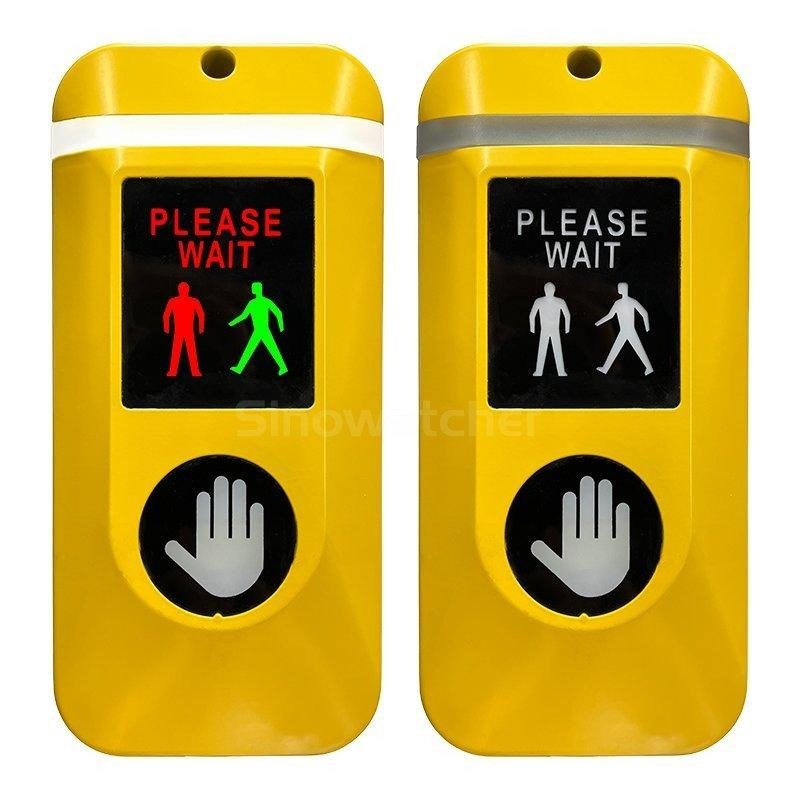
Traditional push buttons demand that a pedestrian reach a specific point and press firmly enough to register, which is not always possible for a wheelchair user or someone with limited grip strength. A contactless pedestrian push button detects a hand held a few centimetres from the sensor, with no physical contact needed. The PedSense contactless push button from Sinowatcher detects a hand at 5-10 cm and includes a mechanical button as a backup, plus acoustic guidance, adaptive volume, LED indicators, and vibration and tactile feedback. When specifying contactless activation, planners should consider these points:
- Mount the sensor at a height reachable from a wheelchair
- Keep a mechanical button as a backup for reliability
- Pair the sensor with LED indicators that confirm the request visually
- Add vibration so the confirmation can be felt as well as seen
Visible Signals for Every Road User
Accessibility also depends on drivers seeing the crossing and yielding in time. A smart crosswalk adds layers of visibility that help drivers notice pedestrians early, especially at uncontrolled crossings with no traffic light. In-ground LED crossing lights flash when a pedestrian is crossing, and projection lamps cast walk and stop symbols onto the crossing surface. Field studies of rectangular rapid flashing beacons report driver yield improvements of up to 80%. Visibility measures that strengthen any accessible crossing include the following:
- In-ground LED crossing lights that flash during the walk phase
- Rectangular rapid flashing beacons at uncontrolled crossings
- Projection lamps casting walk and stop symbols onto the surface
- Pedestrian warning bollards with audio alerts at the kerb
See also: How Technology Is Redefining the Customer Experience
Frequently Asked Questions
What is a smart pedestrian crossing system?
It is a coordinated set of devices, including accessible pedestrian signals, contactless push buttons, LED road studs, and warning bollards, that gives pedestrians crossing information through sound, touch, and light rather than relying on a single visual signal.
How does a smart pedestrian crossing system help visually impaired pedestrians?
It uses audible pedestrian signals with adaptive volume, locator tones, and vibrating tactile arrows so blind and partially sighted pedestrians can find the button, know when to cross, and track the remaining time without sight.
Do contactless push buttons work for wheelchair users?
Yes. A contactless pedestrian push button detects a hand held a few centimetres from the sensor, so it can be activated without reaching or pressing, and the best units include a mechanical button as a backup.
Are smart pedestrian crossings only for people with disabilities?
No. Longer crossing phases, countdown timers, and clearer signals help older pedestrians, children, and anyone carrying loads, so an accessible crossing is safer and easier for every road user.
Final Thoughts
An accessible crossing is a measure of how a city treats its people. When a blind pedestrian can cross independently, when a wheelchair user can activate a signal without a struggle, and when an older person has enough time to reach the far kerb, the street works for everyone. A smart pedestrian crossing system turns that principle into everyday reality.